TCH DAT Extension Download

Map it.Email it.Copy it.

TCH DAT Extension puts three buttons on every load in DAT One, so you can plan the route, email the broker with your MC and send details to your driver without leaving the board.

No card needed. Chrome and other Chromium browsers.

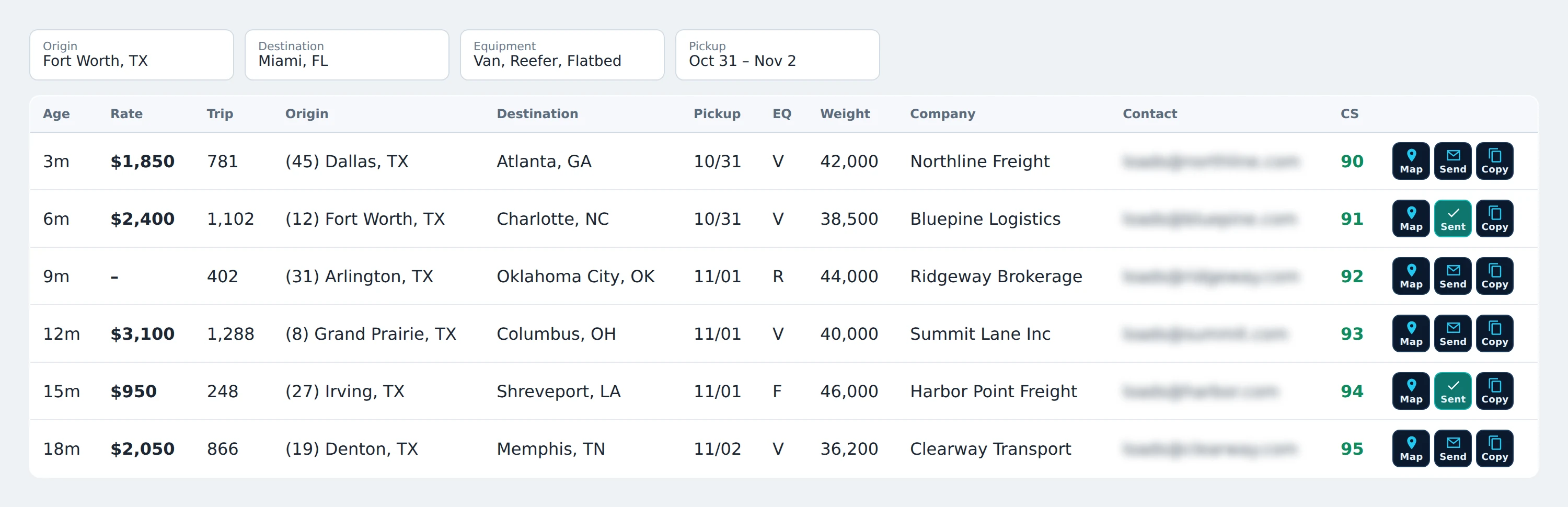
TCH DAT Extension by TCH Providers LLC: a load board with Map, Send and Copy buttons at the end of every load row. Two rows show a green Sent button.

Map

Opens Google Maps with the whole trip: your truck, pickup, delivery and the city you're heading to.

Send

Emails the broker from your own inbox. Pick an MC, check the subject, done.

Copy

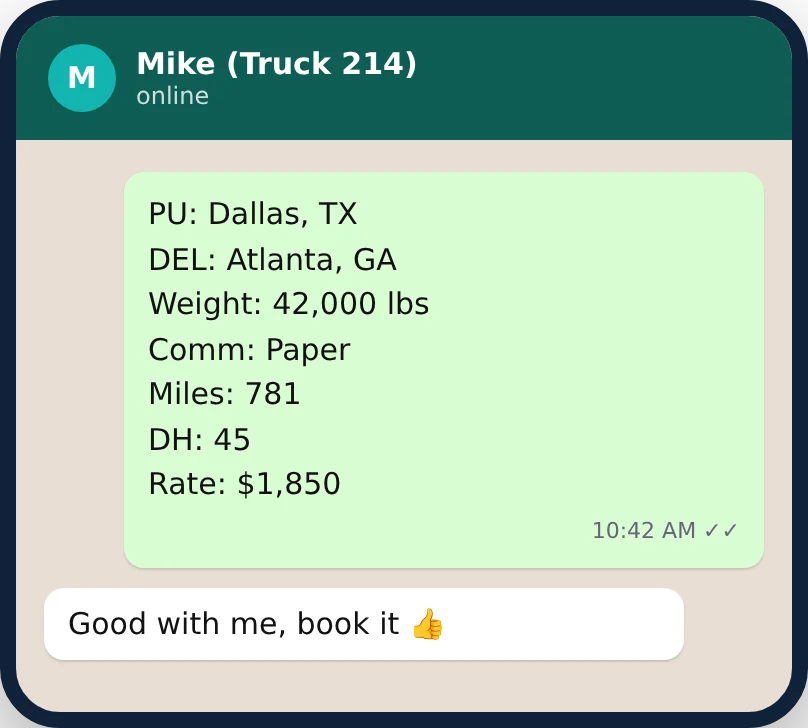
Copies pickup, delivery, weight, miles, deadhead and rate in your format, ready for the driver.

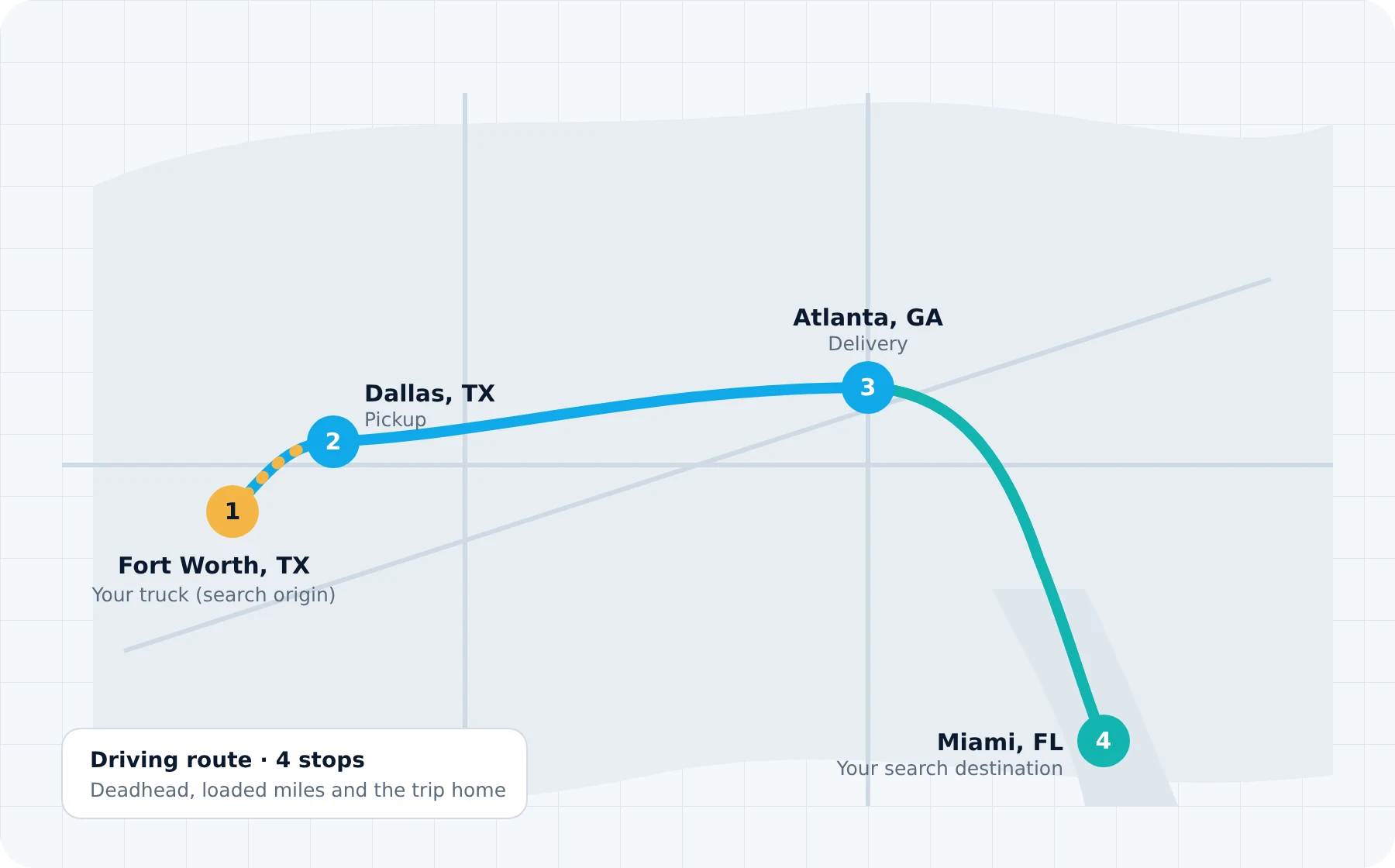
TCH DAT Extension by TCH Providers LLC: route with four numbered stops: Fort Worth, Texas (truck), Dallas (pickup), Atlanta (delivery) and Miami, Florida (search destination).

See the whole trip before you call

Map builds the driving route from where your truck is to the pickup, then to the delivery. If you searched for a destination city, it adds that as the last stop so you can judge the trip home too.

  • Deadhead and loaded miles in one view
  • Adds the 4th stop only when your search destination is a city, not a state
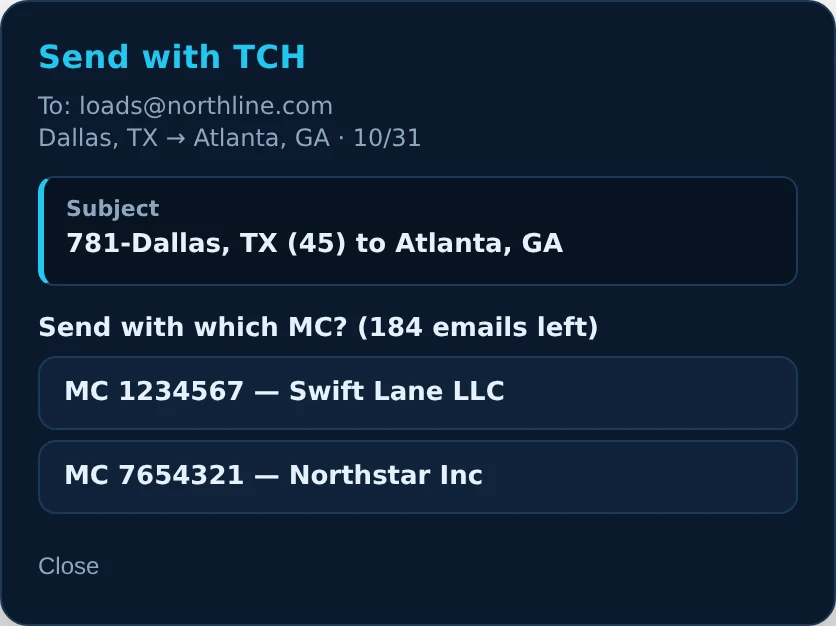
Send with TCH window showing the email subject for this load and two MC buttons to choose from.

Email the broker in one click

Click Send, pick which MC to send with, and the email goes out from your own Gmail, Outlook or company address. The window shows the exact subject the broker will see before you choose.

  • Your template, filled with this load's miles, lanes and deadhead
  • Several MCs and companies on one account
  • Or click any broker email shown on DAT to send right away
TCH DAT Extension by TCH Providers LLC: load details pasted into a chat with a driver: pickup, delivery, weight, commodity, miles, deadhead and rate.

Send load details to your driver

Copy puts the load in your clipboard, laid out the way you like it. Paste it into WhatsApp, a text or your dispatch notes.

  • Choose the fields and order with simple tags like {trip_miles} and {rate}
  • Rate per mile calculated for you, with or without deadhead

Made for a dispatcher's day

The details that save a call, a mistake or a minute, load after load.

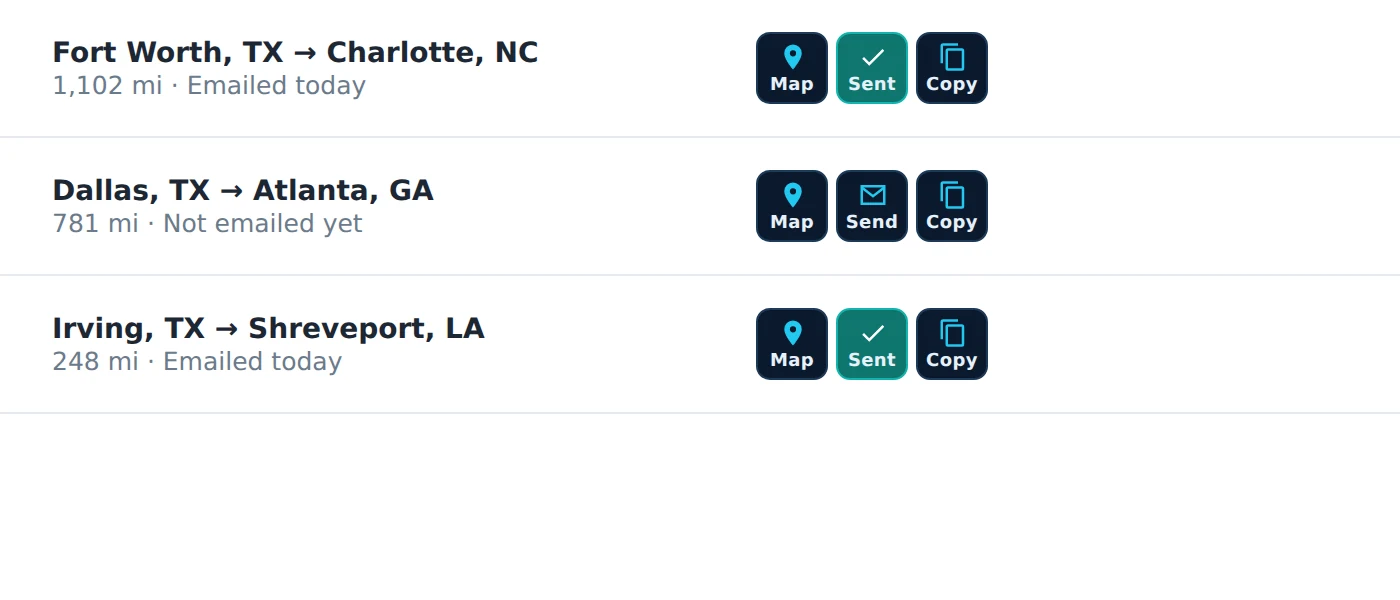
TCH DAT Extension by TCH Providers LLC: three loads: two show a green Sent button because they were emailed today, one shows the normal Send button.
  • The broker's rate, never an estimateOnly the rate the broker posted. DAT's own rate estimates are never mixed in.
  • Exact trip milesLoaded miles and deadhead on every email and copy.
  • Green Sent buttonSee which loads you already emailed today. It resets at midnight Eastern.
  • Stays green when the post changesIf the broker edits the rate or details, the load still shows as sent.
  • New loads work instantlyButtons appear on fresh loads as soon as they land on the board.
  • Keeps DAT fastNothing runs in the background. It only reads the load you click.

Picked the wrong MC? Take it back.

Every email waits six seconds before it leaves. Cancel or Undo in that time and nothing is sent, and no email credit is used.

0 sec

Sending

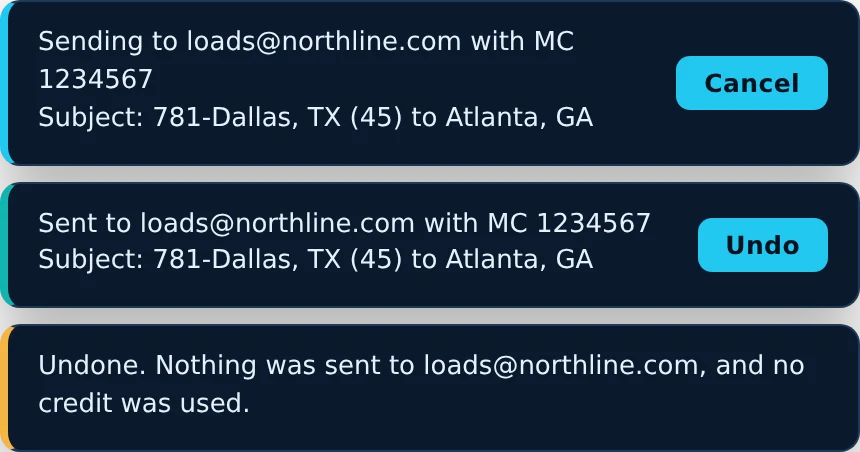
You pick an MC. The message shows the broker, the MC and the subject, with a Cancel button.

3 sec

Sent, with Undo

The message switches to Sent with an Undo button, just like Gmail. The email is still held.

6 sec

Delivered

The email goes out and the load's button turns green. If delivery fails, you see the reason right away.

Undo means nothing was sent. The broker never sees a cancelled email, and your credit count stays the same.

TCH DAT Extension by TCH Providers LLC: three messages: Sending with a Cancel button, Sent with an Undo button, and Undone. Nothing was sent.

Ready in five minutes

  1. Install and sign upAdd the extension to Chrome and create your account. Your 7-day free trial starts right away.
  2. Add your MCsEnter each MC number and company name you dispatch for.
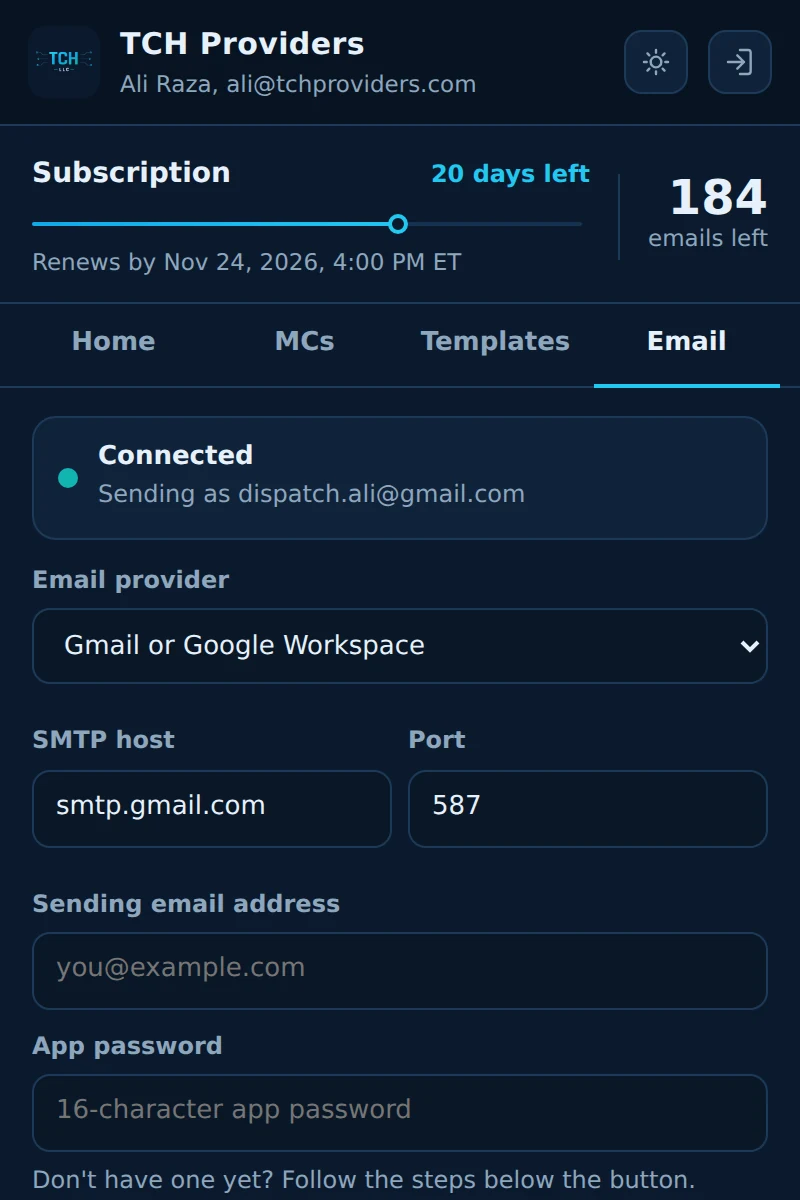
  3. Connect your emailUse an app password from Gmail, Microsoft 365, Outlook or your own domain. The extension shows each step.
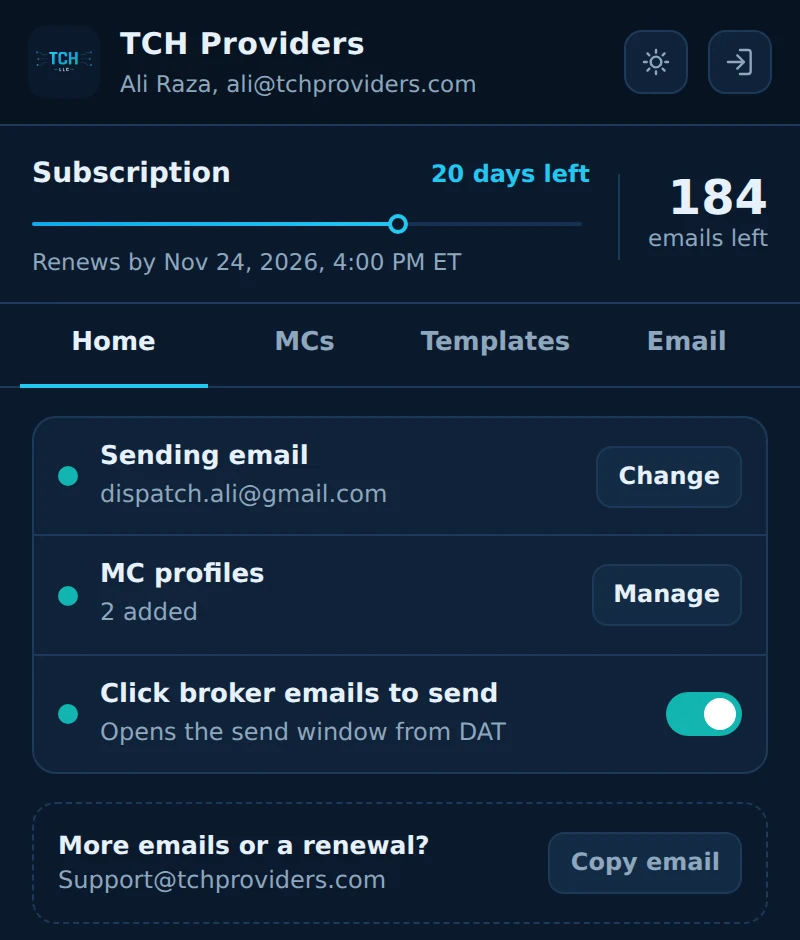
TCH DAT Extension by TCH Providers LLC: extension window showing a subscription with 20 days left, 184 emails left, a connected Gmail address and two MC profiles.
Your plan, remaining emails and setup status in one place.
TCH DAT Extension by TCH Providers LLC: email tab with provider choice, SMTP fields and the steps to create a Gmail app password.
Step-by-step help for Gmail app passwords, plus Microsoft and other providers.

Try it free for a week

Free trial

7 days
No card needed
  • Map, Send and Copy on every load
  • All templates and MC profiles
  • Starter email credits included
Start free trial

Monthly plan

Monthly
Email us for current pricing
  • Everything in the trial
  • Renews on the same date each month
  • Extra email credits available
Email Support to subscribe

When the trial or a subscription ends, Map, Send and Copy pause until it's renewed. Your MCs, templates and email settings stay saved.

Install the extension

Works in Google Chrome, Chromium, Edge and Brave on Windows and Mac.

Download TCH DAT Extension
  1. Download and unzipClick Download TCH DAT Extension. In the Google Drive folder that opens, download the newest .zip file and unzip it. You'll get a folder named extension.
  2. Open the extensions pageType chrome://extensions in the address bar and turn on Developer mode in the top right.
  3. Load the folderClick Load unpacked and choose the extension folder.
  4. Pin and sign inPin TCH Providers from the puzzle-piece icon, open it and start your free trial.
  5. Reopen DATClose your DAT tabs and open DAT One again. The buttons appear on every load.

Questions

Does it work with DAT One?

Yes. It adds its buttons to the load board on one.dat.com in Chrome and other Chromium browsers.

Will it slow DAT down?

No. Nothing runs in the background and it doesn't touch DAT's data feed. It only reads a load when you click one of its buttons.

Whose email address sends the message?

Yours. Brokers see your name and address and reply straight to your inbox.

Is my email password safe?

You connect with an app password, not your real password. It's stored encrypted, and you can revoke it at any time from your Google or Microsoft account.

Which rate does it use?

Only the rate the broker posted. If no rate is posted, the rate stays blank. DAT's rate estimates are never used.

Can I use one account on two computers?

One account works on one computer at a time. Log out on the first computer, or ask support to sign you out, to switch.

What happens when my trial ends?

Map, Send and Copy pause until you subscribe. Your MCs, templates and email settings stay saved.

TCH DAT Extension is an independent product made by TCH LLC. It is not affiliated with, endorsed by or sponsored by DAT Solutions. DAT and DAT One are trademarks of their owner. Screenshots show sample loads.